Web Components in HTML की मदद से reusable custom elements बनाना सीखें। Vivaa Technologies के इस guide में जानिए इसके Core Concepts और implementation।
Web Components in HTML की पूरी जानकारी: Reusable Custom Elements कैसे बनाएं
आज के modern web development में code को reusable बनाना और maintain करना सबसे बड़ी priority होती है। अगर आप एक full-stack developer हैं या web development सीख रहे हैं, तो आपने React या Vue जैसी frameworks में reusable components का इस्तेमाल जरूर किया होगा। लेकिन क्या आप जानते हैं कि बिना किसी heavy framework के, सिर्फ vanilla JavaScript और HTML की मदद से भी custom elements बनाए जा सकते हैं? इसी concept को Web Components in HTML कहा जाता है।
Vivaa Technologies में हम हमेशा students को modern और core web technologies सीखने के लिए encourage करते हैं। इस article में, हम Web Components in HTML के बारे में विस्तार से जानेंगे और देखेंगे कि यह आपके development workflow को कैसे आसान बनाते हैं।
Web Components in HTML क्या हैं?
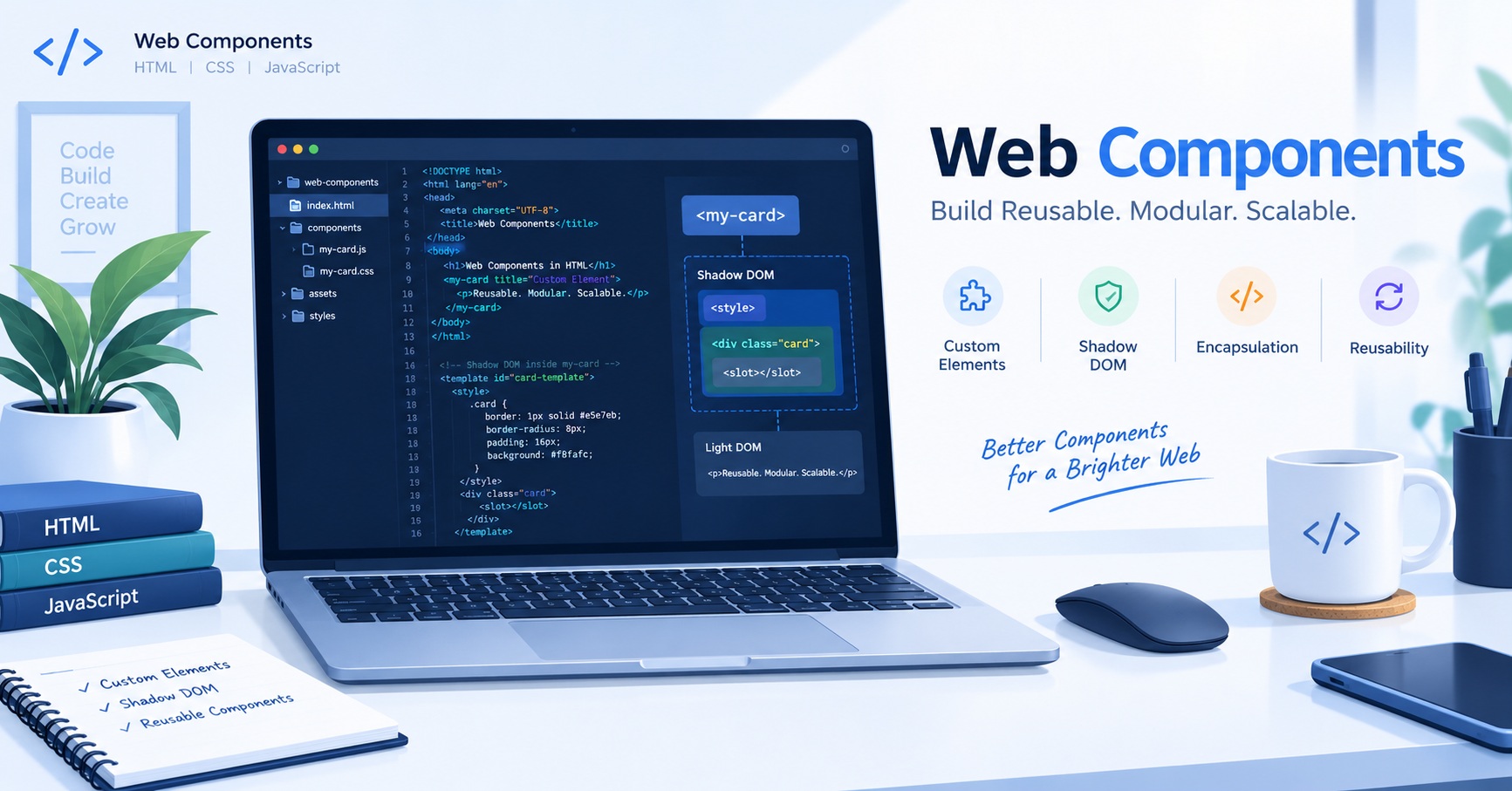
Web Components in HTML standards का एक ऐसा suite है जो आपको web pages और web applications में reusable, custom elements बनाने की अनुमति देता है। ये elements browser के DOM में encapsulate होते हैं और इन्हें किसी भी framework के बिना standard HTML, CSS, और JavaScript के साथ use किया जा सकता है।
Web Components in HTML मुख्य रूप से तीन main technologies पर based होते हैं:
Custom Elements: JavaScript APIs जो आपको custom HTML tags (जैसे
<my-element>) define करने की अनुमति देती हैं।Shadow DOM: यह DOM का एक encapsulated sub-tree है, जो styling और markup को main document से अलग रखता है ताकि CSS styles leak न हों।
HTML Templates:
<template>और<slot>elements जो HTML fragments को define करने में मदद करते हैं जो page load होने पर render नहीं होते, बल्कि बाद में JavaScript द्वारा instantiate किए जाते हैं।
Web Components in HTML क्यों जरूरी हैं?
Traditional web development में जब हम बार-बार एक ही UI component (जैसे navigation bar, card, या modal) बनाते हैं, तो हमें code को duplicate करना पड़ता है या complex frameworks पर depend रहना पड़ता है। Web Components in HTML का इस्तेमाल करने के कई major benefits हैं:
Reusability: एक बार component बनाने के बाद आप उसे किसी भी project में reuse कर सकते हैं।
Encapsulation: Shadow DOM की वजह से CSS और JavaScript scope isolation मिलता है, जिससे global styles का conflict नहीं होता।
Framework Agnostic: ये components React, Angular, Vue या plain HTML – किसी भी environment में seamlessly run करते हैं।
Web Components in HTML का एक Simple Example
आइए एक simple custom element बनाते हैं जो screen पर एक greeting message display करे।
HTML
<!DOCTYPE html>
<html lang="hi">
<head>
    <meta charset="UTF-8">
    <title>Web Components in HTML Example</title>
</head>
<body>

    <!-- Custom Element का इस्तेमाल -->
    <hello-world></hello-world>

    <script>
        // Custom Element Define करना
        class HelloWorld extends HTMLElement {
            constructor() {
                super();
                // Shadow DOM attach करना
                const shadow = this.attachShadow({ mode: 'open' });
                shadow.innerHTML = `
                    <style>
                        p {
                            color: #2563eb;
                            font-family: Arial, sans-serif;
                            font-size: 18px;
                            font-weight: bold;
                        }
                    </style>
                    <p>Hello from Vivaa Technologies Web Component!</p>
                `;
            }
        }

        // Browser में element register करना
        customElements.define('hello-world', HelloWorld);
    </script>

</body>
</html>
Conclusion
Web Components in HTML modern web development का एक powerful tool हैं जो developers को lightweight और reusable applications बनाने की ताकत देते हैं। बिना किसी heavy framework के modular code लिखने के लिए यह सीखना बेहद जरूरी है। अपनी web development skills को और बेहतर बनाने के लिए Vivaa Technologies के साथ जुड़े रहें और practice करते रहें!