जानिए HTML Boolean Attributes क्या होते हैं और यह Forms, Media Elements और UI Control में कैसे काम करते हैं। Vivaa Technologies का Complete Guide.
HTML Boolean Attributes: Complete Guide for Web Developers
जब हम HTML Attributes की बात करते हैं, तो ज्यादातर Attributes में Value की ज़रूरत होती है, जैसे href="[https://example.com](https://example.com)" या src="image.jpg"। लेकिन क्या आपने कभी गौर किया है कि required, disabled, या checked जैसी चीज़ों में हमें Value देने की ज़रूरत क्यों नहीं पड़ती?
इन्हीं Special Attributes को Web Development में Boolean Attributes कहा जाता है। Vivaa Technologies के इस Tutorial में आज हम समझेंगे कि Boolean Attributes क्या हैं, इनका Behind-the-scenes Logic क्या है, और Clean Code लिखते समय कौन-कौन सी Mistakes से बचना चाहिए।
Boolean Attributes क्या होते हैं?
Computer Science में Boolean का मतलब होता है: True या False (1 या 0)।
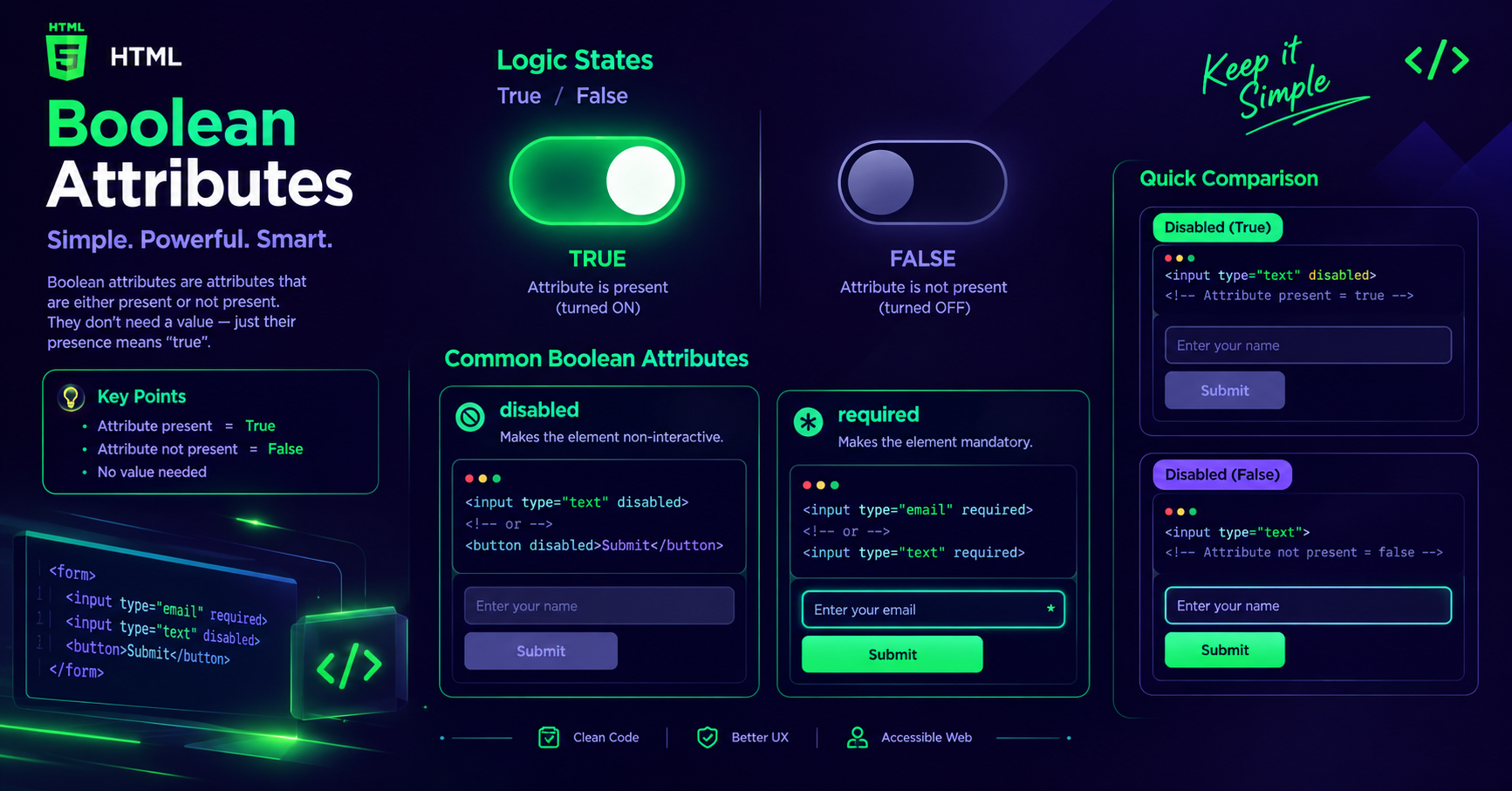
HTML में Boolean Attribute की मौजूदगी (Presence) का मतलब होता है True, और उसकी अनुपस्थिति (Absence) का मतलब होता है False। अगर कोई Boolean Attribute किसी Element में लिखा हुआ है, तो Browser उसे Active मानेगा, भले ही उसमें कोई Value Assign की गई हो या नहीं।
Common Examples of Boolean Attributes
Boolean Attributes का यूज़ सबसे ज़्यादा Forms, Inputs और Media Elements में किया जाता है। नीचे कुछ सबसे Popular Examples दिए गए हैं:
disabled: यह Element को User Interaction के लिए Inactive बना देता है।
required: यह फॉर्म Submissions के टाइम Input Field को Mandatory घोषित करता है।
checked: यह Checkbox या Radio Button को Page Load होते ही Default Checked स्टेट में रखता है।
readonly: यह Input Field को Read-only बनाता है, जिससे User Text तो Select कर सकता है लेकिन Change नहीं कर सकता।
autoplay: यह Video या Audio Elements को Web Page Load होते ही Automatic Play करना स्टार्ट कर देता है।
controls: यह Media Elements जैसे Audio और Video पर Play, Pause, और Volume Buttons ऐड करता है।
Syntax Rules और Common Mistakes
Boolean Attributes का इस्तेमाल करते समय Developers अक्सर कुछ गलतियां कर बैठते हैं। आइए देखते हैं कि इन्हें सही तरीके से कैसे लिखा जाए:
Correct Syntax Options
HTML
The Common False Trap
एक बहुत ही Common Confusion यह है कि Developers Attribute को Disable करने के लिए disabled="false" लिख देते हैं।
HTML
Click Me
HTML Specs के अनुसार, अगर disabled शब्द का नाम Element में मौजूद है, तो Browser उसे Active (True) ही मानेगा। Button तब भी Disabled ही रहेगा। अगर आप Element को Enable करना चाहते हैं, तो आपको Attribute को पूरी तरह से Remove करना होगा।
JavaScript के साथ Boolean Attributes को Control करना
Modern Frontend Development (React, Vue, या Vanilla JS) में DOM Manipulation के दौरान Boolean Attributes का काफी Use होता है।
JavaScript
const submitBtn = document.querySelector('#submit-btn');

// Attribute को Enable (True) करना
submitBtn.disabled = true;

// Attribute को Disable (False) करना
submitBtn.disabled = false;

// DOM methods के साथ
submitBtn.setAttribute('disabled', ''); // Enable
submitBtn.removeAttribute('disabled');  // Disable
Conclusion
HTML Boolean Attributes को सही से समझना कोड की Cleanliness और Form Handling के लिए बहुत जरूरी है। छोटे-छोटे Attributes के पीछे का Logic जानना ही एक Beginner को Pro Web Developer बनाता है।
यदि आप Full-Stack Web Development को आसान तरीके से, Practical Projects और Mentorship के साथ सीखना चाहते हैं, तो Vivaa Technologies आपके लिए Best Platform है। आज ही हमारे Industry-Ready Coding Programs जॉइन करें और अपने Tech Career को Accelerate करें।