HTML Input Types किसी भी web form का backbone होते हैं। इस complete guide में जानें basic से ले कर advanced HTML5 Input Types और उनका सही use case।
HTML Input Types: Full-Stack Developers के लिए Complete Guide
जब आप कोई web application बनाते हैं, तो user data collect करने के लिए forms सबसे ज़रूरी element होते हैं। HTML में <input> tag forms का सबसे versatile part है। सही type attribute select करने से न सिर्फ user experience बेहतर होता है, बल्कि form validation और accessibility भी आसान हो जाती है।
Vivaa Technologies में हम अपने students को हमेशा clean और efficient code लिखना सिखाते हैं। इस detailed tutorial में हम HTML Input Types के basic से लेकर advanced concepts को गहराई से समझेंगे ताकि आप अपने forms को ज़्यादा interactive बना सकें।
Basic HTML Input Types
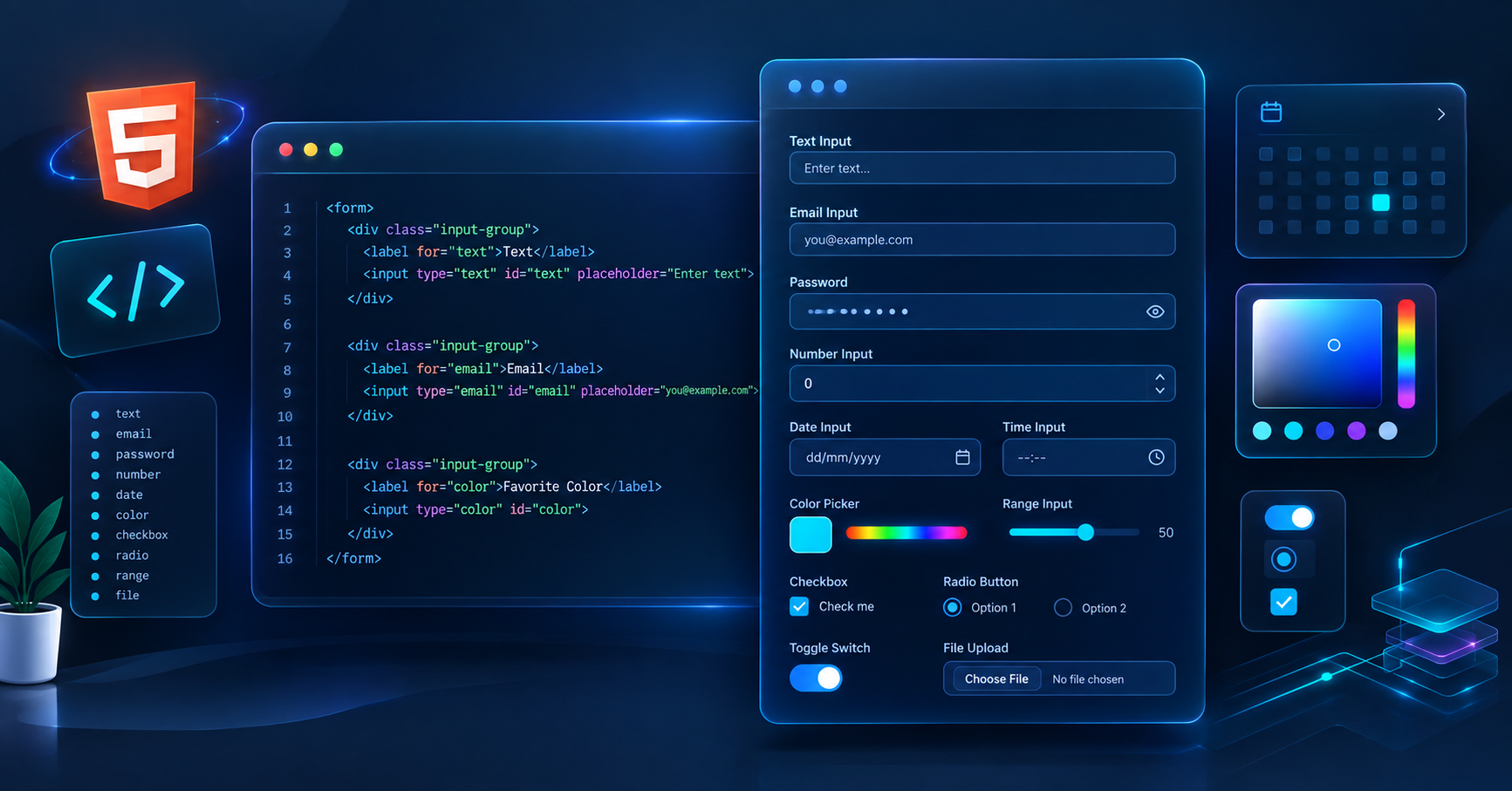
आपने लगभग हर login या signup form में इन basic HTML Input Types का इस्तेमाल देखा होगा।
text: यह default input type है। इसका use single-line plain text inputs के लिए होता है जैसे Name या Username।
password: इस type में entered characters mask हो जाते हैं (dots या asterisks के रूप में), जिससे sensitive data screen पर visible नहीं होता।
email: इसमें built-in validation होती है जो check करती है कि user ने valid email format (e.g., [email protected]) enter किया है या नहीं।
number: इसका use numeric values accept करने के लिए होता है। आप
min,max, औरstepattributes से rules set कर सकते हैं।submit और reset:
submitform के data को server पर भेजने के लिए button बनाता है, जबकिresetform के सभी fields को default values पर reset कर देता है।
HTML
<!-- Basic Form Example -->
<form action="/submit-data" method="POST">
  <label for="username">Username:</label>
  <input type="text" id="username" name="username" required>

  <label for="user-email">Email:</label>
  <input type="email" id="user-email" name="user-email" required>

  <label for="user-pass">Password:</label>
  <input type="password" id="user-pass" name="user-pass" required>

  <input type="submit" value="Register">
</form>
Selection और Options Inputs
Users से multiple choices में से selection करवाने के लिए अलग-अलग HTML Input Types का इस्तेमाल होता है।
radio: जब user को दिए गए options में से सिर्फ एक choice select करनी हो। सभी related radio buttons का
nameattribute same होना चाहिए।checkbox: जब user एक से ज़्यादा options select कर सकता हो या single agree/disagree condition हो।
color: यह एक color picker UI open करता है जिससे user hexadecimal color code select कर सकता है।
range: Quantity या intensity select करने के लिए slider control देता है। इसमें
minऔरmaxattributes use होते हैं।
HTML
<!-- Selection Inputs Example -->
<label for="theme-color">Choose Accent Color:</label>
<input type="color" id="theme-color" name="theme-color" value="#3b82f6">

<label for="volume">Volume Control:</label>
<input type="range" id="volume" name="volume" min="0" max="100">
Date और Time HTML Input Types
HTML5 ने date और time handle करने के लिए built-in HTML Input Types देकर developers का काम बहुत आसान कर दिया है। इनसे mobile devices पर native date pickers open होते हैं।
date: User को year, month, और day select करने का UI मिलता है।
time: Time (hours और minutes) select करने के लिए।
datetime-local: Date और time दोनों एक साथ select करने के लिए बिना किसी timezone overhead के।
month: Particular month और year select करने के लिए।
week: Specific week number और year select करने के लिए।
Advanced और Specialized HTML Input Types
Professional web development में कुछ specialized HTML Input Types user input flow को आसान बनाते हैं।
file: User को local storage से files upload करने की permission देता है। Multiple files के लिए
multipleattribute और file types restrict करने के लिएacceptattribute का use होता है।url: Website addresses enter करने के लिए। इसमें automatic URL formatting validation होती है।
tel: Telephone numbers के लिए। यह mobile devices पर numeric keypad trigger करता है।
search: Search inputs के लिए। Normal text field की तरह होता है लेकिन इसमें clear ('X') button जैसा browser integration मिलता है।
hidden: Screen पर visible नहीं होता, लेकिन form submission के साथ data (जैसे user IDs या security tokens) server तक भेजने के लिए use होता है।
HTML
<!-- File Upload with Constraints -->
<label for="resume">Upload Resume (PDF only):</label>
<input type="file" id="resume" name="resume" accept=".pdf">
Best Practices for HTML Forms
Labels का Use करें: हर input field के साथ
<label>tag औरforattribute का इस्तेमाल ज़रूर करें ताकि accessibility बेहतर हो सके।Proper Attributes Set करें: Input parameters control करने के लिए
placeholder,required,readonly, औरdisabledजैसे attributes का सही जगह प्रयोग करें।Mobile Responsiveness: सही HTML Input Types (
tel,email,number) use करने से mobile browser correct keyboard layout display करता है, जिससे mobile UX improve होता है।
Conclusion
अलग-अलग HTML Input Types की सही समझ ही किसी वेब डेवलपर को एक बेहतरीन Frontend Developer बनाती है। Clean UX, automatic browser validation, और accessible web design के लिए सही input type चुनना हर full-stack developer के लिए ज़रूरी है।
Vivaa Technologies में हमारा goal developers को practical और industry-ready skills सिखाना है। अपने अगले web project में इन अलग-अलग HTML Input Types को try करें और अपने forms को ज़्यादा interactive बनाएं।