Web development में HTML forms का role critical होता है। इस guide में सीखें HTML forms के basic tags, input types, validation और best practices को practical examples के साथ।
HTML Forms Guide: Web Development में Forms कैसे बनाएं
Web development की दुनिया में जब आप कोई website या application बनाते हैं, तो users के साथ interaction करना सबसे important part होता है। चाहे login page हो, registration panel, feedback box हो या online payment checkout—हर जगह HTML Forms का use होता है।
Vivaa Technologies पर हमारा हमेशा यह मानना है कि जब तक आपके fundamentals clear नहीं होंगे, तब तक आप एक अच्छे full-stack developer नहीं बन सकते। इस blog post में हम HTML forms के हर एक aspect को detail में समझेंगे।
HTML Form क्या होता है?
HTML Form एक ऐसा document section है जो users से input data collect करने और उसे server पर भेजने के काम आता है। जब कोई user form में details fill करके submit button पर click करता है, तो वह data HTTP request के जरिए backend server पर process होने चला जाता है।
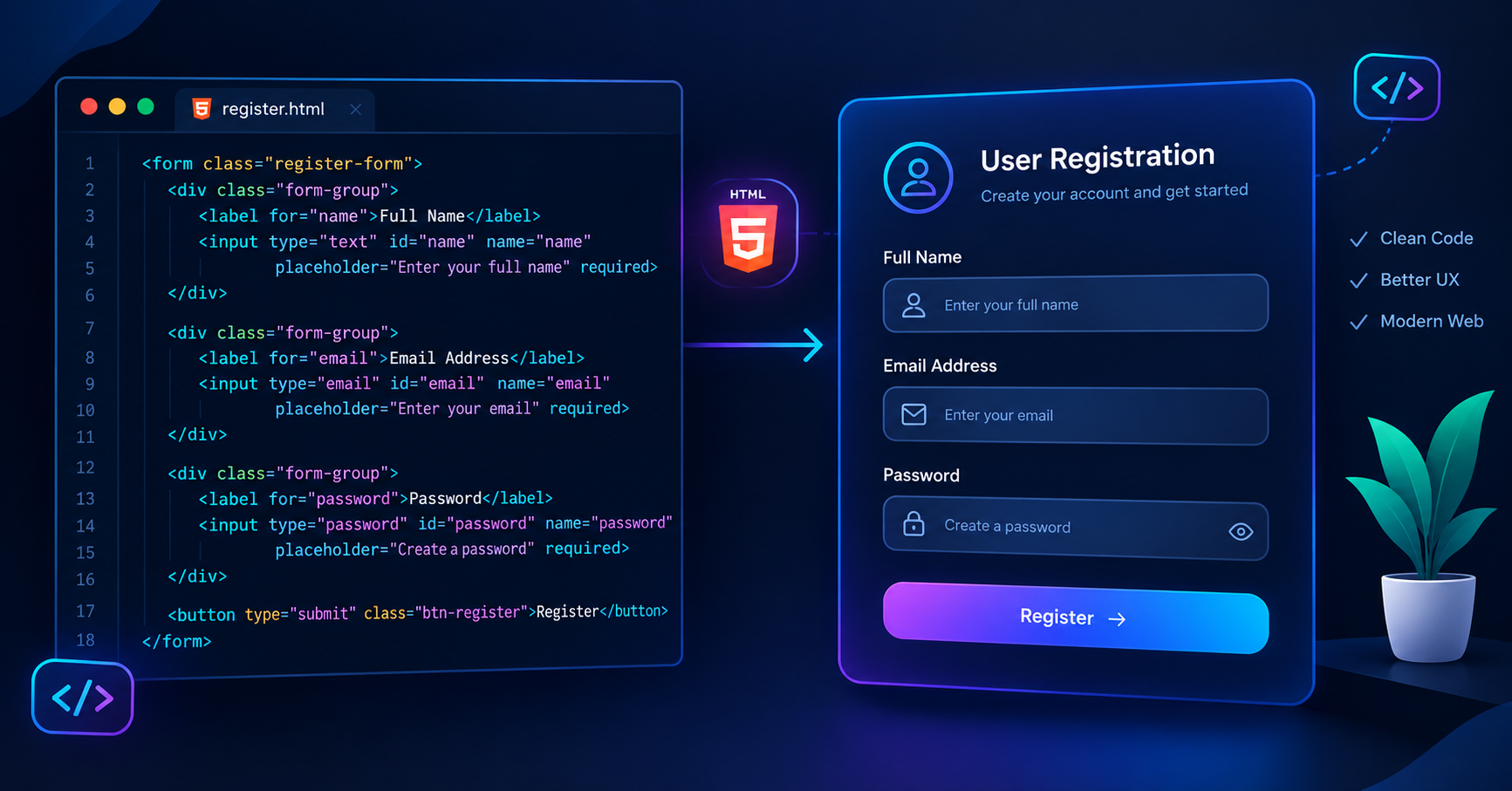
Form बनाने के लिए HTML में <form> tag का use किया जाता है।
HTML Form के Essential Attributes
<form> element में दो सबसे important attributes होते हैं जिन्हें समझना हर developer के लिए जरूरी है:
action: यह attribute बताता है कि form submit होने के बाद data किस URL या server file पर भेजा जाएगा।
method: यह specify करता है कि data किस HTTP method के जरिए भेजा जाएगा। Commercial projects में मुख्य रूप से दो methods use होते हैं:
GET: जब data URL में query parameter के रूप में दिखता है। यह search bar के लिए suitable होता है।
POST: जब data HTTP request body में secure तरीके से जाता है। Sensitive data जैसे password या credit card details के लिए POST method जरूरी है।
Important Form Elements और Attributes
Form के अंदर अलग-अलग तरह के input controls होते हैं। आइए इनके सबसे common tags और उनके attributes को देखते हैं:
<label>: यह user को बताता है कि particular input box किस चीज के लिए है। Accessible websites बनाने के लिएforattribute का use जरूरी होता है।<input>: यह सबसे versatile tag है।typeattribute के basis पर इसका behavior change होता है:type="text"- Basic text entry के लिए।type="password"- Text को dots या asterisks में hide करने के लिए।type="email"- Email address format checking के लिए।type="number"- Numeric inputs के लिए।type="checkbox"- Multiple choices select करने के लिए।type="radio"- एक single option select करने के लिए।type="submit"- Form submit करने के लिए button।
<textarea>: Multi-line text input के लिए, जैसे feedback या address।<select>और<option>: Dropdown list बनाने के लिए।
Form Validation: User Data सही रखना
Client-side form validation से आप बिना server पर request भेजे user के input को verify कर सकते हैं:
required: इस attribute से user empty input submit नहीं कर सकता।
placeholder: Input field के अंदर एक temporary hint message दिखाने के लिए।
minlength और maxlength: Text की length limit set करने के लिए।
pattern: Regular Expressions (Regex) का use करके custom pattern validate करने के लिए।
Full-Stack Web Development में Forms का Importance
जब आप MERN stack, Python Django, या PHP जैसे frameworks सीखते हैं, तब HTML forms front-end और back-end के बीच bridge का काम करते हैं। Backend API हमेशा form data को process करके database (जैसे MongoDB या PostgreSQL) में save करती है। इसलिए semantic HTML forms लिखना और सही attributes का use करना critical है।
Vivaa Technologies के web development course में हम students को ऐसे ही core concepts hands-on projects के साथ सिखाते हैं ताकि उनके fundamentals strong हो सकें।