Web development सीखते समय HTML में tables कैसे बनाएँ, यह जानना एक आवश्यक skill है। इस guide में table elements, attributes और responsive table techniques को detail में समझें।
HTML में Tables कैसे बनाएँ: Complete Guide for Beginners
जब आप कोई web application विकसित करते हैं, तो अक्सर आपको structured data जैसे pricing plans, timetables, product comparisons या user directories को व्यवस्थित तरीके से दिखाना होता है। Data को rows और columns में सटीक रूप से प्रेजेंट करने के लिए HTML tables सबसे प्रभावी माध्यम हैं। यदि आप full-stack development सीख रहे हैं और जानना चाहते हैं कि HTML में tables कैसे बनाएँ, तो यह विस्तृत tutorial आपकी सहायता के लिए तैयार किया गया है।
Vivaa Technologies में हमारा लक्ष्य हमेशा आपको व्यावहारिक और industry-standard web skills सिखाना है। आइए step-by-step समझते हैं कि HTML tables के आवश्यक components और semantic elements कैसे काम करते हैं।
HTML Table के Basic Building Blocks
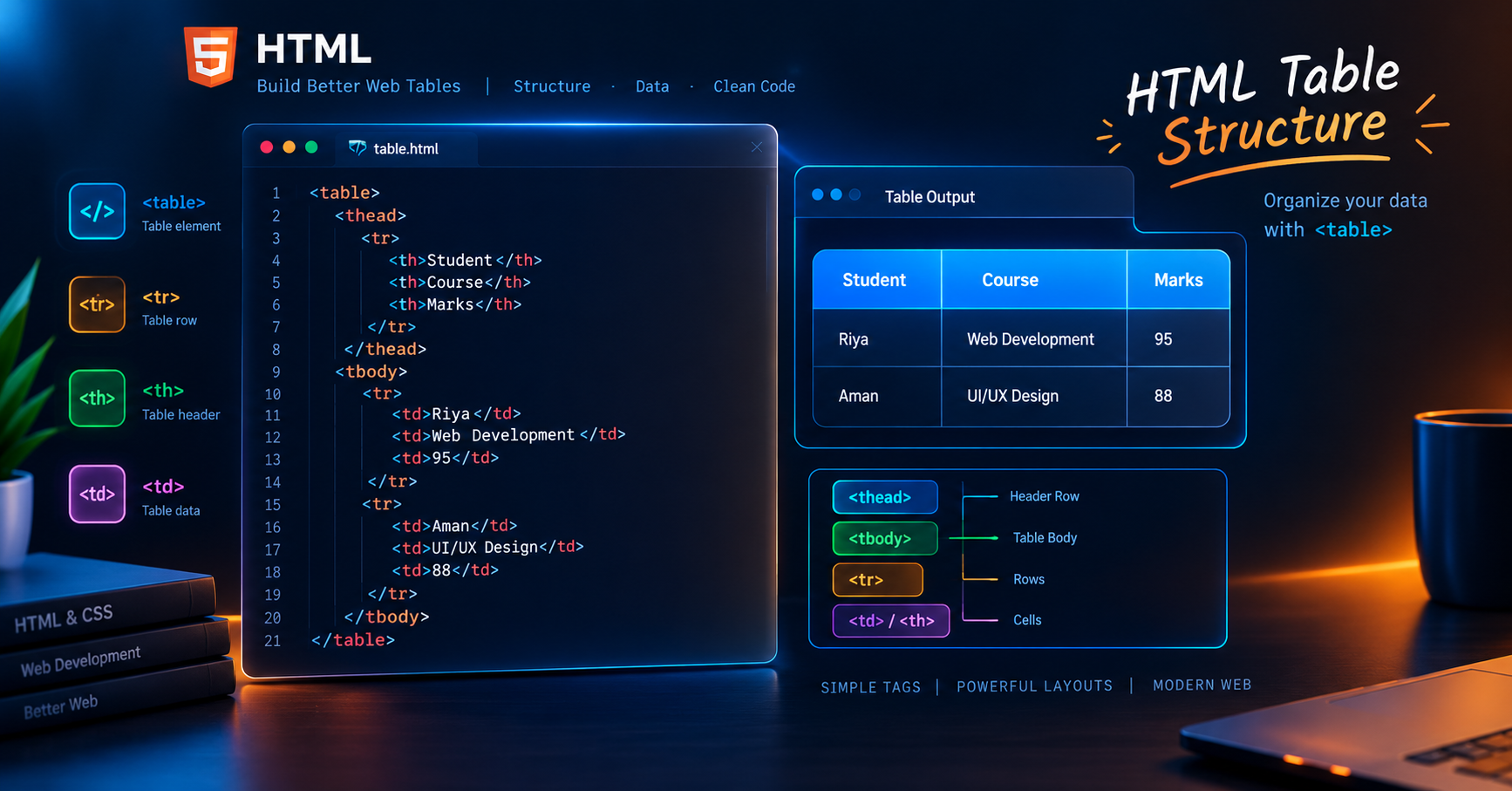
HTML में table बनाने के लिए कई मुख्य tags एक साथ मिलकर काम करते हैं:
<table>: यह मुख्य wrapper tag है जो सम्पूर्ण table structure को define करता है।<tr>(Table Row) : Table में एक horizontal row तैयार करता है।<th>(Table Header) : Table के header cell को दर्शाता है। इसमें लिखा text डिफ़ॉल्ट रूप से bold और centered होता है।<td>(Table Data) : Normal data cell को दर्शाता है जिसमें मुख्य जानकारी रखी जाती है।
Basic Syntax:
HTML
<table>
  <tr>
    <th>Name</th>
    <th>Role</th>
    <th>Experience</th>
  </tr>
  <tr>
    <td>Rahul Kumar</td>
    <td>Full Stack Developer</td>
    <td>2 Years</td>
  </tr>
  <tr>
    <td>Priya Sharma</td>
    <td>UI/UX Designer</td>
    <td>3 Years</td>
  </tr>
</table>
Semantic HTML Table Structure
Professional web applications में केवल basic tags ही पर्याप्त नहीं होते। SEO accessibility और स्क्रीन रीडर्स के लिए Semantic Table Elements का उपयोग किया जाता है:
<caption>: Table की मुख्य heading या summary प्रदान करता है।<thead>: Table के header content को एक समूह में रखता है।<tbody>: Table के मुख्य data rows को समाहित करता है।<tfoot>: Table के निचले हिस्से जैसे total count या summary row को दर्शाता है।
Semantic Structure Example:
HTML
<table>
  <caption>Vivaa Technologies Course Fee Structure</caption>
  <thead>
    <tr>
      <th>Course Name</th>
      <th>Duration</th>
      <th>Level</th>
    </tr>
  </thead>
  <tbody>
    <tr>
      <td>Full Stack Web Development</td>
      <td>6 Months</td>
      <td>Advanced</td>
    </tr>
    <tr>
      <td>Frontend Mastery</td>
      <td>3 Months</td>
      <td>Beginner</td>
    </tr>
  </tbody>
  <tfoot>
    <tr>
      <td colspan="3">Total Programs Available: 2</td>
    </tr>
  </tfoot>
</table>
Advanced Attributes: Colspan और Rowspan
जब आपको दो या दो से अधिक cells को आपस में merge करना हो, तब colspan और rowspan का उपयोग किया जाता है:
Colspan : Multiple columns को horizontally merge करता है।
Rowspan : Multiple rows को vertically merge करता है।
Example:
HTML
<!-- Merging 2 columns -->
<td colspan="2">Merged Header or Data</td>

<!-- Merging 2 rows -->
<td rowspan="2">Merged Row Data</td>
Web Performance और Responsive Tables Best Practices
Screen Readers के लिए Scope Attribute का उपयोग करें
<th>tag के अंदरscope="col"याscope="row"जोड़ने से स्क्रीन रीडर्स समझ पाते हैं कि header किस दिशा से संबंधित है।Layout Shifts रोकने के लिए Border Collapse का उपयोग करें CSS में
border-collapse: collapse;का उपयोग करके clean grid lines प्राप्त की जा सकती हैं।Mobile Responsive Strategy स्मार्टफोन स्क्रीन पर बड़ी tables कट जाती हैं। इसके समाधान के लिए table wrapper div पर
overflow-x: auto;लागू करें:
HTML
<div style="overflow-x: auto;">
  <table>
    <!-- Table content -->
  </table>
</div>
Conclusion
यह समझना कि HTML में tables कैसे बनाएँ, एक कुशल developer बनने की दिशा में एक बुनियादी कदम है। Semantic elements और responsive wrappers का उपयोग करके आप स्वच्छ और प्रभावी user experience तैयार कर सकते हैं। Vivaa Technologies पर हम आपको ऐसे ही व्यावहारिक concepts मास्टर करने में मदद करते हैं। Clean code लिखते रहें और बेहतर प्रोजेक्ट्स बनाते रहें।